
一、用到的adb命令
(1)查看activity:
adb shell dumpsys window | findstr mCurrentFocusadb shell dumpsys activity activities
(2)启动app:
adb shell am start -W -n package/activity
(3)停止app:
adb shell am force-stop package
(4)home退出app:
adb shell input keyevent 3
二、脚本实现策略
策略一:获取命令执行时间,作为启动时间参考值,比较好实现。
策略二:在命令前后加上时间戳,以差值作为参考值,比较准确。
三、测试数据分析
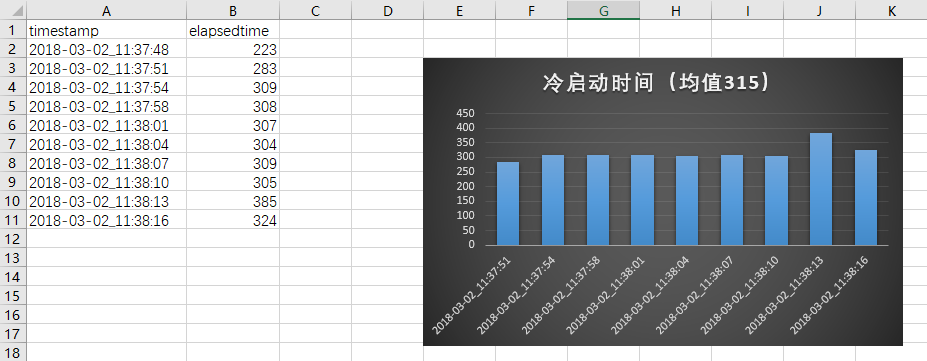
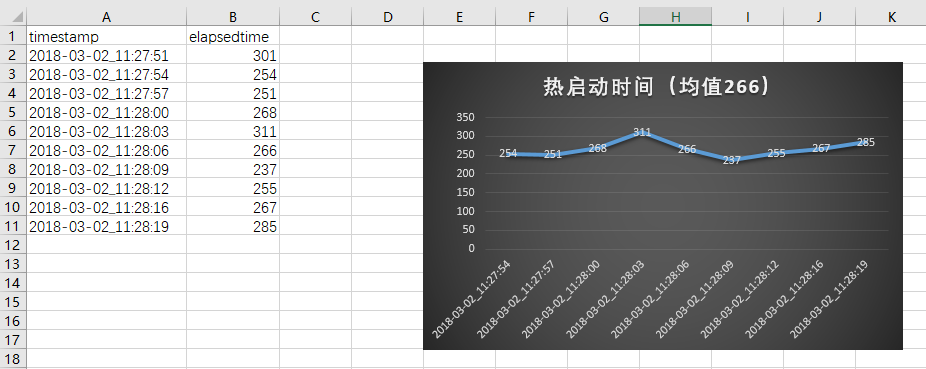
一般剔除第一次数据,取剩余次数数据进行分析,因为第一次往往不准确。
(1)均值。
(2)曲线的波动范围。
(3)不同版本对比。
(4)和竞品对比。
四、代码实现示例
(1)冷启动
2
3
4
5
6
7
8
9
10
11
12
13
14
15
16
17
18
19
20
21
22
23
24
25
26
27
28
29
30
31
32
33
34
35
36
37
38
39
40
41
42
43
44
45
46
47
48
49
50
51
52
53
54
55
56
57
58
59
60
61
62
63
64
65
66
67
68
69
70
71
72
73
74
#coding=utf-8
import os
import time
import csv
#app类
class App(object):
def __init__(self):
self.content = ''
self.startTime = 0
#启动app
def LaunchApp(self):
cmd = 'adb shell am start -W -n com.android.calculator2/com.android.calculator2.Calculator'
self.content = os.popen(cmd)
#停止app
def StopApp(self):
#冷启动时强制退出
cmd = 'adb shell am force-stop com.android.calculator2'
os.popen(cmd)
#获取启动时间
def GetLaunchedTime(self):
for line in self.content.readlines():
if 'ThisTime' in line:
#split(':')[1]截取启动时间;strip('\n')去掉换行符
self.startTime = line.split(':')[1].strip('\n')
break
return self.startTime
#控制类
class Controller(object):
def __init__(self,count):
self.app = App()
self.counter = count
self.allData = [('timestamp','elapsedtime')]
#单次启动和停止
def LaunchAndStop(self):
self.app.LaunchApp()
elapsedtime = self.app.GetLaunchedTime()
time.sleep(1)
self.app.StopApp()
currenttime = self.GetCurrentTime()
time.sleep(1)
self.allData.append((currenttime,elapsedtime))
#多次执行启动和停止
def run(self):
while self.counter>0:
self.LaunchAndStop()
self.counter = self.counter-1
#获取当前时间戳
def GetCurrentTime(self):
#时间格式如果写成%Y-%m-%d %H:%M:%S,写入csv时会被自定义格式隐藏秒
currentTime = time.strftime('%Y-%m-%d_%H:%M:%S', time.localtime())
return currentTime
#数据存储
def SaveDataToCSV(self):
csvfile=open('coldStartTime.csv', 'w', newline='')
writer = csv.writer(csvfile)
writer.writerows(self.allData)
csvfile.close()
if __name__ == '__main__':
controller = Controller(10)
controller.run()
controller.SaveDataToCSV()
(2)热启动
2
3
4
5
6
7
8
9
10
11
12
13
14
15
16
17
18
19
20
21
22
23
24
25
26
27
28
29
30
31
32
33
34
35
36
37
38
39
40
41
42
43
44
45
46
47
48
49
50
51
52
53
54
55
56
57
58
59
60
61
62
63
64
65
66
67
68
69
70
71
72
#coding=utf-8
import os
import time
import csv
#app类
class App(object):
def __init__(self):
self.content = ''
self.startTime = 0
#启动app
def LaunchApp(self):
cmd = 'adb shell am start -W -n com.android.calculator2/com.android.calculator2.Calculator'
self.content = os.popen(cmd)
#停止app
def StopApp(self):
#热启动时home键退出
cmd = 'adb shell input keyevent 3'
os.popen(cmd)
#获取启动时间
def GetLaunchedTime(self):
for line in self.content.readlines():
if 'ThisTime' in line:
#split(':')[1]截取启动时间;strip('\n')去掉换行符
self.startTime = line.split(':')[1].strip('\n')
break
return self.startTime
#控制类
class Controller(object):
def __init__(self,count):
self.app = App()
self.counter = count
self.allData = [('timestamp','elapsedtime')]
#单次启动和停止
def LaunchAndStop(self):
self.app.LaunchApp()
elapsedtime = self.app.GetLaunchedTime()
time.sleep(1)
self.app.StopApp()
currenttime = self.GetCurrentTime()
time.sleep(1)
self.allData.append((currenttime,elapsedtime))
#多次执行启动和停止
def run(self):
while self.counter>0:
self.LaunchAndStop()
self.counter = self.counter-1
#获取当前时间戳
def GetCurrentTime(self):
#时间格式如果写成%Y-%m-%d %H:%M:%S,写入csv时会被自定义格式隐藏秒
currentTime = time.strftime('%Y-%m-%d_%H:%M:%S', time.localtime())
return currentTime
#数据存储
def SaveDataToCSV(self):
with open('hotStartTime.csv', 'w', newline='') as csvfile:
writer = csv.writer(csvfile)
writer.writerows(self.allData)
if __name__ == '__main__':
controller = Controller(10)
controller.run()
controller.SaveDataToCSV()
五、测试结果示例
(1)冷启动
(2)热启动
持续更新…
最后更新: 2018年05月11日 14:52